It can be challenging to operate electronic circuits on breadboards or on universal plates. The DipTrace program, which offers all the necessary tools for creating simple or multi-layered and complex printing circuits, or schematics or manufacturing files, allows you to do this very easily and quickly. The program, which also offers the Turkish language option, provides a powerful and easy-to-use solution that can be purchased by all electronics designers. We talked about DipTrace with DipTrace Sales Representative Fazil Demir.
Fazil, can you please talk about yourself a bit?
I was born in 1978 in Trabzon, Salpazari. I completed elementary, middle and high schools there. I graduated from Gazi University TEF Electronics Teaching Department in 1999. I graduated from the Department of Electrical and Electronics Engineering of Ondokuz Mayis University in 2015. I am currently doing a master's degree at the same university.
How did you meet DipTrace? Can you give information about this developer company?
I joined the company in 2006. I always followed circuit design programs closely due to my profession and curiosity. I was trying all the EDA programs I could reach in those years. And during my researches, I came across DipTrace. The fact that it offers an easy user interface and that I completely figured out the program in a short time increased my interest even more. Then I found out that the program has an infrastructure that allows translation into different languages, and I translated it into Turkish. That's how my DipTrace adventure started. DipTrace is being developed by Ukraine-based Novarm Ltd. Founded in 2002, the company released the first version in 2004. Since then, the software has been constantly evolving, adding new features based on industry requirements and user feedbacks. It has around 20 global distributors and has sold to more than 72 countries.
Could you elaborate a bit on the Turkish nature of the program?
The program fetches interface language expressions from the language files. I translated these files into Turkish with a small program provided by the developer. Thanks to this, the DipTrace program can be used 100% in Turkish. You just need to download and install the language pack. By removing the language pack, you can get back to English again.
What advantages does this offer? What is the difference between using the program in Turkish or English?
I can say that I did not try to simplify the translation by writing the Turkish versions of the expressions only while doing the translation. I tried to create the errors that appear in specific menus, warning messages and situations, and give the most appropriate Turkish equivalent. In fact, I can easily say that in some cases, the Turkish expression is more descriptive than the English expression about a specific error that caused the warning. Also, the exact Turkish equivalent of some expressions may seem irrelevant to the PCB designer. I also took this into account during translation. Of course, using the program in Turkish is up to the designer's preference. Many designers prefer English. However, I would like to point out that those who are concerned that the Turkish version does not provide the same taste as the original can use the Turkish program with peace of mind.
What features stand out when you compare them with similar ones?
DipTrace is a professional PCB design program. It offers all the necessary tools for creating simple or multi-layered and complex printing circuits, or schematics or manufacturing files. I can express the outstanding features as follows. It can be used 100% in Turkish at the very beginning. It has an easy-to-learn and user-friendly interface. There are free version with full functions, reasonable price and license options. It also has a fast and user-oriented support concept. The developer company takes into account the feedbacks from users and quickly creates solutions or adds new features to the program. Thanks to the feedbacks I received, I was able to add new features to the program. This is an indication of the importance the developer attaches to user feedbacks. You will appreciate how important after-sales support is, both in terms of feedback and technical support. Also, you don’t need to buy a specific service to access this support on DipTrace. In short, I can say that the most important difference of the program is that it offers advanced features with a user-friendly interface and ease of use.
Can you tell us about the capabilities of the program?
The program consists of four modules: Schematic, PCB Layout, Component and Pattern Editor.
Schematic drawing
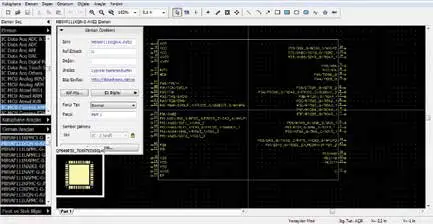
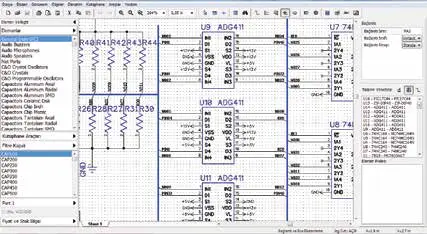
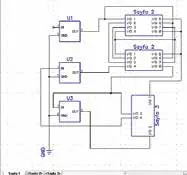
The schematic drawing is done in the Schematic module. (Figure 1) It supports multi-page and multi-level hierarchical design. (Figure 2) You can make visual and logical pin connections.
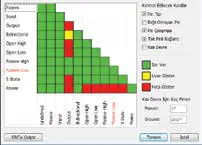
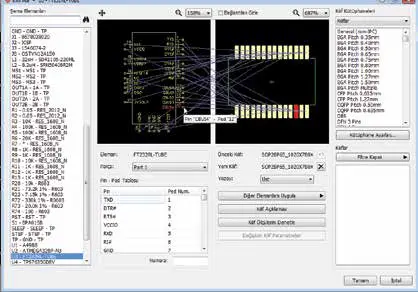
It offers file and netlist import and export features with other CAD programs. Electrical rule control (ERC), (Figure 3) connection class structure for connections, differential pair support, and visual symbol case assignment screen. (Figure 4) It makes the diagram drawing easier.

PCB Design
PCB Layout is a PCB design module. (Figure 5) Schematic drawing can be transferred to PCB Layout with one click. Intelligent hand-drawing with differential pair support for PCB Layout printed-circuit board design (Figure 6), a high-speed shape-based automatic plotter, comprehensive bill of materials (BOM) generation including prices and suppliers, panel creation options, and extensive import/export capabilities.

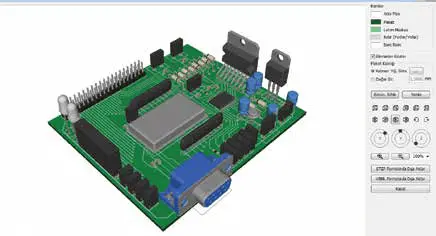
3D preview of the design (Figure 7)can be made and exported for mechanical CAD modeling. *.wrl, *.3ds, *.step and *.iges 3D model support. Design requirements are determined by connection classes, rules between classes, and detailed settings for each class or layer according to the object types in hand. In-depth design rules checking (DRC), real-time DRC detecting errors during design, connection conductivity checking, and comparison with the source schematic file ensure the highest quality of the final product. Fixed and free angle, arc and curve shaped path drawing, several path drawing modes, external auto plotter support, priority adjustable copper fillings, element locking, list and auto placement, layer stacking, typesetting options, meander insertion and length comparison (phase tuning) can also be used in PCB Layout
You can export files to RS-274X Gerber, Gerber X2, Excellon N/C Drill, ODB++, Gerber X2, IPC-D-356A Netlist, Pick and Place and DXF formats, as well as exchange files and libraries with DXF, Eagle, P-CAD, Altium, KiCad, PADS and OrCAD.

Creating a library
DipTrace offers two separate modules for Schematic symbol and case creation & editing. Component and Pattern Editor. (Figure 8) (Figure 9) There are more than 160000 elements and more than 22000 cases in standard libraries that comply with the IPC-7351 standard.
You can easily create your own elements and cases using custom templates, batch pin naming, BDSL import, pad renumbering, and bus management tools that will significantly increase your working speed. Pattern Editor offers an automatic case and a 3D model maker that comply with IPC-7351 standards (Figure 10). You can import library files from other EDA software.
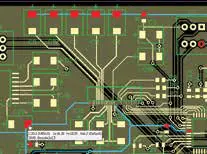
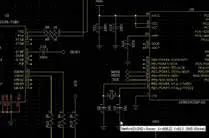
The color scheme can be changed in all modules of the program. The ability to change the color of any path, connection, or object you want. Also, when a pin connection or path is selected, all the connected pins, connections, and paths are illuminated (Figure 11) (Figure 12), making design tracking easier. With built-in Snap EDA integration (Figure 13), you can access the symbol cases and 3D models of more than 10 million elements from within the program and place them in your design or library.
How can those who want to try the program access it?
The free version of the program, which allows 300 pins and 2 signal layers, and a 30-day full-function trial version are available from the website. The free version is functionally the same as the full version, except for some pin and layer limitations. The user manual, which describes to use the program step by step, is uploaded to the computer with installation. Also, the Turkish user manual is loaded with a language pack and can be accessed from the program menu.
Can you give information about license options and updates?
DipTrace offers lifetime (permanent) license options, not subscription-based ones. The user can choose a license according to the number of pins and signal layers they need. If they wish, they can increase it by just paying the difference. All minor updates are free, major updates are up to ¼ of the full fee. For example, a designer who buys Version 4 can upgrade to all updates for free, until version 5 is released. They can continue without upgrading to Version 5, as well as upgrade to version 5 by giving ¼ fee. Among the license types, there is only a limitation on the number of pins and signal layers. In terms of functions, they are all the same as the full version. Also, 50% discount is applied for hobbyists and academic users.